
Last updated - March 17, 2023
When you are running an eCommerce store, you need to continuously innovate to keep your customers interested in your store and products. Interestingly, one of the strategies many store owners are trying is to allow customization options. Customers would really like it if you are giving extra options on the product page to let them personalize the products they are purchasing. The scope of customization would definitely improve the user experience. In addition, it will help your order fulfillment process. You can build customers relationships for the long term and successfully boost your sales and conversions as well. This article will discuss some of the best WooCommerce extra product options plugins available currently in the market. Moreover, you will get a clear idea why customization is an essential aspect of eCommerce.
WooCommerce extra product options plugins
Store owners and customers both can benefit from having extra options on the product page of the WooCommerce store. Customers get a chance to involve themselves in the products they are buying from your store. On the other hand, store owners are more sure about customers’ needs and can make necessary adjustments to their store strategies. Let’s look into some of the best WooCommerce extra product options plugins available in the market.
Product Add-Ons
You can easily give your customers the option to give their input to personalize the products they are purchasing using this extension. Basically, the extension achieves this by giving options like input boxes, dropdowns, and checkboxes. In addition, you can also add checkboxes, select boxes, radio buttons, text areas, etc as well. You can add custom fields just above the ‘Ádd to Cart’ button. The fields can be added globally across all your products, or only to specific products that you choose. Unfortunately, you can’t create different add-ons for each separate variation part of a variable product.

WooCommerce Extra Product Options
This plugin provides a lot of flexibility to incorporate additional options on your WooCommerce product page. You can create different extra fields on your product page including checkboxes, radio button, date picker, etc. In addition, you can use conditional logic to display fields and create variations with its own prices. It also enables you to define a style for the forms that you create, and place the fields according to your liking.

With this plugin, you can show the extra product options anywhere on the product page. Moreover, you can selectively display additional options based on user roles. The plugin is compatible with many popular options including WooCommerce subscriptions and catalog mode plugins. The regular license of this plugin would cost you $24.
YayExtra – WooCommerce Extra Product Options
This fantastic WooCommerce plugin helps you bring extra product options to live with a range of customizable field types. From dropdown lists and radio buttons to color swatches and number inputs, you have the power to assign custom options to your groups of products.
YayExtra (FREE) offers a vast selection of product field types to meet your unique needs.
- Add text, number, email, or anything else, YayExtra has you covered.
- Customize the original product with radio buttons, checkboxes, and button rows.
- Apply one-time fees in both percentage and fixed amounts
- Add multiple fees to multiple product options.
- Easily keep track of the subtotal for the selected extras.

But wait, there’s more! YayExtra allows you to display related options side-by-side or vertically, as well as trigger the display of the next product field.
You can also apply the product fields to all products, a group of products in a specific category, a group of products with a specific tag, or even hand-picked products.
To take it one step further, you can even use the conditional logic option to show the next product field, depending on the customer’s selection.
ThemeHigh WooCommerce Extra Product Options
This is another plugin that helps you customize the product page on your WooCommerce store. It helps to add custom fields to your product pages and also lets you create sections in predetermined positions on the product page. The custom sections can be before or after the ‘Add to Cart’ button, and you can add custom fields to it. And if you want to change the order of display of these custom fields on the product page, you can easily do that too. Additionally, the plugin supports the translation of the label and placeholder text of custom fields to any other language.

You can also apply conditional logic while using this plugin to display custom fields based on the product, category or the value in the other fields. Also, you can add a field that would customize the price of a product too. For example, you can create a ‘percentage price field’ to define an additional price in percentage. You can purchase the single site license of this plugin for $39.
Kickflip product customizer for Woocommerce
The custom options possibilities are endless with Kickflip. From adding images, text, material, colors, components, and extra prices per option, unleash your customer’s creativity! Allow your customers to add text or artwork to a product, create personalized jewelry, or customize furniture pieces with ease. Empower your customer’s creativity, increase their engagement, and boost conversions with outstanding product customization experiences.
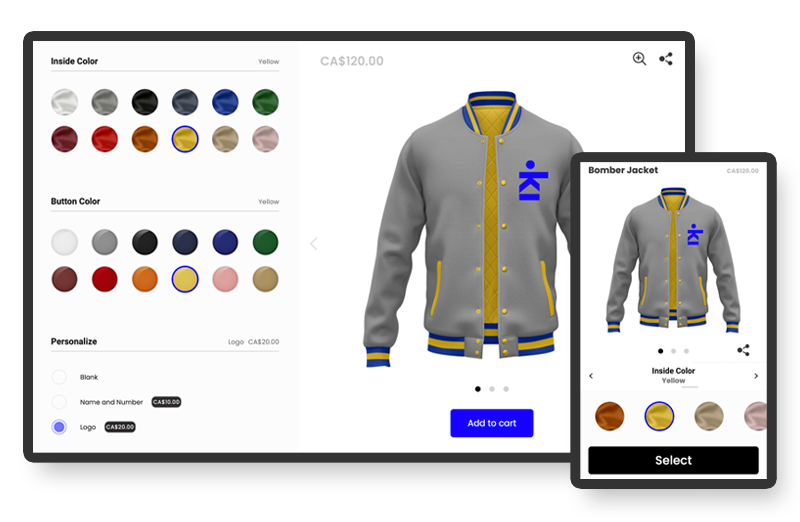
Kickflip is the most easy-to-use custom product options plugin for WooCommerce. Not only for you to set up your products but for your customers to personalize them. With high-quality live previews of every product option, customers can see their designs from multiple angles, and customize them in real-time. It considerably increases your customers’ confidence to buy your products, boosting your sales. Kickflip also has very available and professional customer support to help you with any questions you may have.
Pricing for Kickflip is $0/month. Pay per successful sales only (2.19% transaction fee)
Start your free trial
WooCommerce Custom Fields
This plugin offers many options to customize your WooCommerce store and the customer experience. In addition to setting extra product options, this plugin also allows creating custom checkout, order and user fields. In fact, with the help of this plugin, you can open a better communication channel with your customers. You can optimize the customer experience on your store and thereby ensure better sales and conversions too.

Using WooCommerce Custom Fields plugin, you can create products or features that go along with a product. This way you can up sell a lot of products on your store. From a customer perspective, these features are more relevant in customizing the products of their choice. The plugin provides greater scope of customization by offering conditional logic and customer input pricing too. Furthermore, this plugin helps you gather additional information from customers, and also to share shipping details. Overall, the plugin helps in reducing manual efforts and help you focus on customer relationship management as well.
WooCommerce Product Options
This new and feature-rich plugin provides users various ways to add extra options to their products that include dropdown menus, checkboxes, radio buttons, image buttons, color swatches, and text fields. It has a user-friendly interface that allows users to easily manage and create their options which they can assign as global product options or to specific products and categories only.
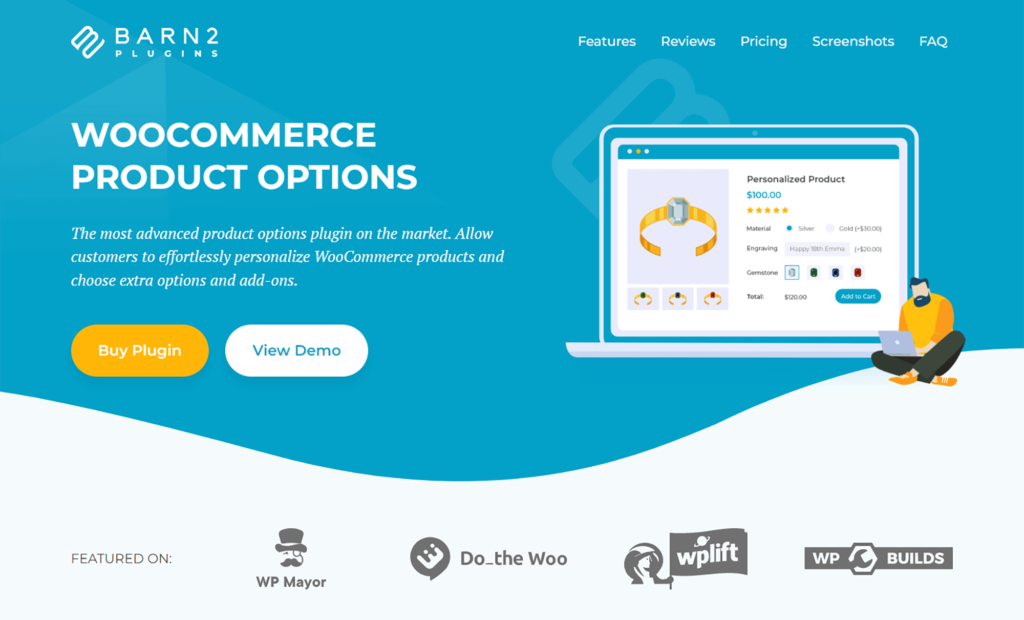
In addition, this plugin also provides a number of features that can help you to optimize your store’s checkout process and has a range of customization options to help you tailor the plugin to your store’s specific needs. For example, you can use it to add required options or to set minimum and maximum quantities. It also has a conditional logic feature that provides users a way to show/hide options based on the terms selected which is useful if you wish to provide customers with a more personal way of customizing their orders.
WC Fields Factory
This plugin helps you gather additional information from customers when they check out from your store. For example, customers can input a print for a t-shirt or give a request for guest wrapping a product. In addition, you will get an option to add custom fields specific to variations. Another interesting feature of this plugin is customer input pricing. Based on the value in a custom field provided by the customer, it overrides the price of a product.

WC Fields Factory plugin supports over ten different types of product and admin fields, including radio buttons, date picker, and text area. In addition, as the plugin is compatible to WPML, without hassles you can translate the labels, messages, etc., of the custom fields that you add.
WooCommerce Product Add-ons Ultimate
The plugin helps you create additional fields on your WooCommerce product page, which your customers can configure. There is no limit to the number of fields that you can add, and this way you can create a truly personalized experience for your customers. You can set a price for product add-ons that would enhance the upselling capabilities of your store. In addition, you can easily duplicate fields, or even import them from other products.

Why is product customization important in eCommerce?
Customizing what we are purchasing has become a common aspect of our lives. Without giving it much thought, we are actively customizing products, be it choosing the toppings of a pizza, or the print on a t-shirt. When you are running an online store powered by WooCommerce, you have several options to provide customization features. However, it is important to constantly take feedback from customers to understand the effectiveness of your strategies. Firstly, let’s look at some of the reasons why customization is really important for eCommerce store owners.
It makes customers happy
When you are running a business, your customers are the most important aspect that you should be focusing on. You will be able to drive the growth of your store only by building a loyal group of customers who will consistently purchase from you. According to a survey among online shoppers, more than 25% indicated that they would like to have an option to customization. Moreover, product customization improves the scope of engagement for the customers. When they are customizing a product, customers are spending a considerable time on your website. This sort of helps them in familiarizing with your brand. And once they are happy with a purchase, this increases the chances for them to come back.
Premium services at premium rates
Customization is still seen as a premium service in the eCommerce industry. So, naturally, customers will be willing to pay more for a product that they can customize. This is especially relevant when you see the rise of price comparison websites. Due to the abundance of options, most of the newer generation shoppers are not truly loyal to a brand or store. The tendency is to simply choose the least expensive one from an array of options. In fact, customization can offer some value in this regard – if it is done in a unique manner. And naturally, customers would be more willing to spend a few extra dollars on a product they can customize.
Better word-of-mouth popularity
A satisfied customer holds a great potential to help you market your products. If customers feel they got a kind of unique experience from shopping on your site, then they are going to share that with friends and family. That will do a lot of good for your store. On top of that, if you strategically encourage your customers, you can really boost your store’s popularity. Offering referral reward programs might be a good idea to ensure that your customers contribute to the marketing aspects of your store. Naturally, you will find the result of this in the form of increased sales.
Access to new generation shoppers
Considering the evolving trends of business, you can always see a difference in patterns between generations. And when it comes to online shopping and customization, the younger generation is more attuned to it. Naturally, with customization, you are going to capture the attention of the young generation, who are responsible for a major share of mobile shopping.
Gain better understanding of customer interests
Moreover, customization of products opens up a great scope for product improvement. When you are creating custom fields on the product page, you are opening a channel for customers to share their interests. In fact, you can save some of the time and effort of market research if you use the customization data. If your product pages have an option for customer input, there are more chances for customers to respond there, than on a separate feedback. Mostly, you will be able to capture aspirations of customers that otherwise would not be offered.
How to successfully offer customization?
If you are wondering how to successfully incorporate customization on your site, the best way is to look at the efforts of other companies who managed it well. Here is a quick look at some of the best strategies that you can follow.
Have a clear idea of your requirements
You need to be always clear on why you are using customization as a strategy on your store. Are you using it to increase customer loyalty and engagement? Or, are you more interested in boosting the sales of a particular product? Whichever be your reason, you need to develop the strategy and allocate finances based on that. If you are clear about your goals at the start, you will be more certain in your evaluation of the ROI too. However, there are examples of stores founded solely based on their customization capabilities as well.
Decide on the scope of customization too
How much customization will you be able to offer is another matter of thought. If you are looking at examples, there are varying strategies successfully implemented by companies. For examples, some companies offer complete customization of their products. Some offer just a few additions in the form of extra product options. And then there are some other stores that create custom bundles from their existing product line. You need to decide on the strategy that you are going to follow. Irrespective of the choice, customization is surely going to bring some cheer to your customer engagement and subsequently, sales.
Offer options to share
A customer who has actually personalized a product would have a greater attachment to that product. This also means the motivation to share it in social media circles will be higher. It is important to make use of this scope by offering social media buttons on your site. This way, you can encourage customers to spread your products and ideas.
Avoid unnecessary complexities
Though generally, customers find customization options inviting, they might not enjoy it much if it is too complicated. Therefore, you need to keep it relatively simple, with a tad of difficulty to sustain the interest.
Conclusion
Customization is one of the most important strategies that multiple store owners are trying. It helps a lot in improving customer engagement, loyalty, and sales. Moreover, it can help with marketing efforts, as customers would naturally like to share customized products. WooCommerce extra product options plugins give you a chance to let your customers personalize the products. This article has listed out some of the best plugins you can try for extra product options. You have also got an idea of the importance of customization in the years to come. Let us know if you have a specific comment on product customization in eCommerce.
Also read: How to Dynamically Charge Extra Fee in your WooCommerce Store?