Last updated - July 29, 2026
Managing orders efficiently is one of the most important aspects of your shipping process. If the customer receives an order late or the wrong order, then your business will be in trouble. This is why you need WooCommerce Order Management plugins to help your business.
While WooCommerce has a really intuitive order management system, with increasing orders, you might need external help as well. This is where an order management plugin comes in to help. It allows you to automate workflows, reduce manual effort, and improve fulfillment accuracy. All of these are essential in enhancing the customer experience, which is crucial for retention (making sure your customers buy from you again!)
Let’s take a look at the 15 best WooCommerce Order Management Plugins in 2026!
What is a WooCommerce Order Management Plugin?
A WooCommerce order management plugin helps with facilitating the processing, tracking, and fulfillment of orders in your WooCommerce store. The native WooCommerce order dashboard tends to handle basic status updates and works pretty well for stores with an average rate of orders or low daily volumes. However, it may appear limited and will not help you as your business grows, as it can’t meet the demands of scaling. Order management plugins step in to enhance the platform’s functionality and streamline these complex order workflows.
Essential Features to Look For in an Order Management Plugin
Before choosing an order management plugin, here are some factors you should consider whether it offers:
- Bulk Editing
This allows you to save hours of manual labour. You can modify fields, update statuses, or assign tracking information across hundreds of orders simultaneously, rather than processing them one by one.
- Custom order statuses
They let you create specific, color-coded statuses tailored to your fulfillment process (such as “Awaiting Pickup” or “Partially Shipped”), replacing the limitations of WooCommerce’s default “Processing” and “Completed” labels. - Automated workflows
A good order management plugin would help prevent data loss. It would also remove manual data entry by securely exporting order history, mapping imported data, or automatically syncing live order details with external tools like Google Sheets. This helps make your order lifecycle simpler and more seamless.
- Inventory management
As your store grows, so will your inventory. It’ll become harder to manage it manually. Hence, an order management plugin that offers inventory management will automatically update stock levels when orders are placed or canceled. This would help tremendously in streamlining the order workflow.
- Order export and import
Order export and import features help with the prevention of data loss and in simplifying the order lifecycle. If there ever comes a situation where need to migrate your store, back up your complete order history, sync with offline spreadsheets, or send order data to external third-party logistics (3PL) providers for fulfillment, this feature would be extremely beneficial. - Shipment tracking
Without shipment tracking, you’d be unable to keep your customers informed and satisfied. Shipment tracking is essential for your WooCommerce business because it helps improve transparency and keeps customers hooked to your website. It can even push tracking data to payment gateways (like PayPal or Stripe) to protect you from payment disputes - HPOS (High-Performance Order Storage) Compatibility
As a business owner, you should always check whether a plugin is HPOS compatible ( a feature that speeds up your online store by changing how order data is saved). This ensures that your page’s loading time is quick and that the plugin is compatible with any upcoming WooCommerce updates.
- Multi-store support
If you’re managing multiple storefronts at once, then having an order management plugin ensures that there is data sharing among them. This ensures that issues such as out-of-date stock and mismatched prices are avoided. Multi-store support is an essential feature as it creates a live connection between your stores. So when an item sells on one site, the inventory is updated automatically across all of them in real time.
- Third-party integrations
There are several plugins that exist, but very few can work intuitively with your systems. Hence, it’s essential to find one that integrates easily with shipping carriers, payment gateways, email marketing services, or external tools like Google Sheets. This helps in reducing manual data entry and allows easier order management.
- Reporting and analytics
As your operations scale, you need data to guide your strategy. Reporting and analytics features are important because they provide actionable insights into sales trends and help track how well post-purchase campaigns are performing so you can make informed, data-driven decisions.
Now that you know what some important features you can look out for, let’s take a look at some of the available plugins for you!
15 Best WooCommerce Order Management Plugins (2026)
1. WooCommerce After The Order
This is a great plugin that will provide solid assistance in your order processing. It focuses on improving post-purchase operations by helping fulfillment teams process orders more accurately. You or your staff can add product-specific or store-wide processing notes that appear directly inside the WooCommerce dashboard and notification emails. This will then be passed on to the store manager. These messages can be store-wide notices or information provided regarding a specific product or item. These contextual instructions reduce mistakes and improve communication across fulfillment teams.

Features
- Record internal order processing notes specific to products or for all orders.
- Integrate order processing notes with the order notification email.
- Display store notes and product notes when the order is reviewed on the dashboard.
- Reduce errors and improve the order fulfillment accuracy.
- Order workflow optimization with the help of the features.
The plugin costs $49.
2. Order Coupon Subscription Export Import for WooCommerce (by WebToffee)
Say you’re searching to export your WooCommerce store details to be processed by external apps or services. This order management plugin will facilitate the export and import of orders, coupons, and subscriptions in CSV or XML formats with ease. at the same time, it helps with seamless data migration between WooCommerce stores and preserves the entire order history at the same time! It supports the formats of several shipping carriers for easy integration. Moreover, the plugin lets you schedule exports at specified time intervals using cron jobs. The premium version adds advanced functionalities like scheduled automated exports, FTP (File Transfer Protocol) delivery, and a visual column mapping interface.

Features
- Export and import order, coupon, and subscription details from and to your WooCommerce store.
- Supports CSV and XML files.
- Schedule import and export via cron jobs.
- FTP integration
- Smooth user interface that is Ajax-enabled.
- Extensive filtering options to customize the import and export data.
- Compatible with several plugins, including subscriptions.
The cost of a single site license of this plugin is $69.
3. Advanced Orders Export For WooCommerce by AlgolPlus
This plugin by AlgolPlus is one of the most flexible solutions available in the market. It aims to make the order workflow as seamless as possible. You can export order data into different formats such as CSV, Excel, XML, JSON, and PDF with ease. Your users can also create custom exports using a drag-and-drop interface. You can set rules that will export individual orders based on a defined status change. The plugin also lets you schedule imports in simple intervals as well as with more complex daily schedules. Moreover, the plugin helps you send the export data to multiple locations such as email, FTP, SFTP (SSH File Transfer Protocol), URL, etc.

Features
- Export selected orders from your WooCommerce store.
- Schedule export at predefined intervals or at a specified time each day.
- Schedule individual order data export based on order status change.
- Send the export file to email, FTP, SFTP, or URL.
The basic version of the plugin costs $30.
4. WooCommerce Order Status Manager
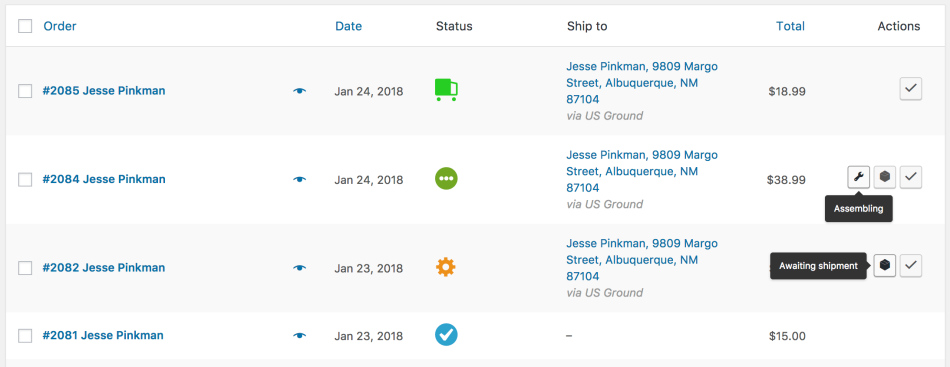
You will be able to add new order statuses to your order management process with the help of this plugin. You can also edit and delete order statuses according to the specific requirements of your store. The newly added order statuses can be included into order actions and bulk actions as well. By adding custom order statuses, you will be able to keep your customers better informed about your order management process, and they will be happier as a result.

Features
- Create new order statuses and icons.
- Provide a description of custom order statuses to help customers.
- Option to edit the default order statuses of WooCommerce.
- Access new statuses from order actions and bulk actions.
- Option to make order statuses “Requires Payment”.
- Trigger new order emails based on custom order statuses.
You can get this plugin for $49.
5. YITH WooCommerce Custom Order Status
YITH WooCommerce Custom Order Status plugin offers various advanced features to manage your orders seamlessly. It builds order workflows that match your business.
With this plugin, you can create unlimited custom order statuses with personalized icons and colours. This helps make it easier for your staff to understand where every order stands as well. You can also define guided fulfillment sequences using “Next Action” buttons and automatically notify customers whenever an order status changes. Also, you will be able to overwrite the existing order statuses available by default on your WooCommerce store. Furthermore, you will be able to include orders with all statuses in the reports.

Features
- Compatible with WPML (WordPress Multilingual plugin).
- Create unlimited custom order statuses in WooCommerce
- Use custom colors and icons for effective identification of statuses.
- Send emails for custom order status changes.
- Guided fulfillment workflow
- Automated customer email notifications
- Option to allow customers to cancel or pay for an order as well as download items.
The cost of a single site subscription to this plugin will be $94.99 per year.
6. WooCommerce Order Status & Actions Manager
You can process multiple orders simultaneously by creating custom statuses using this plugin. It also offers a dashboard widget that will provide you a better view of different orders with different statuses. You can also create different emails for different statuses and determine whether it will be sent to store managers or customers. Moreover, the plugin offers a large range of icons to choose from. You can also assign different colors and styles to distinguish order statuses. You can even set triggers for automatic status changes using this plugin.

Features
- Enhance your order management process with custom order statuses.
- Personalize order statuses with unique colors, styling, and icons.
- Dashboard widget for a better overview of orders.
- Prompt store managers to leave order notes while processing an order.
- Define when product reviews can be submitted.
- Trigger automatic status updates after a defined period of time.
It will cost you $49 for a Regular License of this plugin.
7. Sequential Order Numbers Pro
Organizing your orders well is an important aspect of order management. This plugin will help you assign sequential order numbers to your WooCommerce store. Moreover, it lets you customize the order number by specifying starting number or by adding prefixes and suffixes. You can also specify the length of the order number as well. If your store is already accepting orders, you can set this plugin to follow the existing pattern if required.

Features
- Create sequential order numbers on your WooCommerce store.
- Follow the existing numbering pattern on your store.
- Add suffixes and prefixes to order numbers.
- Include time or date information as a prefix or suffix.
- Set a length for the order number.
- Exclude orders with only free products from numbering.
The cost of the plugin is $49 for a year.
8. Store Manager for WooCommerce- WooCommerce Order Management
This plugin will help you make order management much easier when you are selling through more than one retail channel. It can process 1000 orders at one time in a single click. And you can easily remove any faulty orders or those that you created to test. It also helps you easily add or modify details in an order even during the fulfillment stage. Moreover, you can use this plugin to import order data as well as customer information from your store to any third-party system. Furthermore, it offers extensive analytics features that will help you take progressive actions to improve your business prospects.

Features
- Easily manage orders from different retail channels.
- Bulk update order status.
- Edit and modify order details.
- Option to export and import order data.
- Delete incorrect orders and duplicate ones.
- Extensive analytics features.
You can purchase the Store Manager for WooCommerce plugin, and the cost is $99 for a Standard Edition single-user license and the PRO Edition costs $199 for a single user.
9. Smart Sequence Order Number for WooCommerce
Smart Sequence Order Number for WooCommerce is an incredible WooCommerce plugin that helps businesses of all sizes provide existing and potential customers with an engaging yet results-driven shopping experience.
This powerful plugin is a game changer for your online WooCommerce store because it allows you to revolutionize your store’s order numbering system. This way, you can ensure consistency and transparency in your order management system.
In short, Smart Sequence Order Number for WooCommerce helps you set unique formats innovatively.
Features
- Include dates or characters at the start of your order numbers without fuss.
- Include dates or characters at the end of your order numbers instantly.
- Customers can track their own orders hassle-free.
- Customers can mention their preferred starting order numbers.
- Customers can see real-time samples of their custom formats before saving them.
The plugin costs $4.09 per month and $49 per year.
Hopefully, you will find these WooCommerce order management plugins useful for your store. Leave us a comment to share your thoughts.

10. Smart Manager for WooCommerce
Smart Manager is an order management plugin that can replace WooCommerce’s admin interface with its own dashboard. It has a spreadsheet-style dashboard that would help you manage products, orders, customers, and even coupons from a single screen itself! It’s becoming famous in the WooCommerce domain because of its centralized dashboard.
Its inline editing, advanced filtering, and bulk editing capabilities make it a favorite among high-volume WooCommerce stores.

Key Features
- Spreadsheet interface that makes order management easier.
- Bulk editing allows business owners to apply changes to hundreds or thousands of records at the exact same time.
- Advanced search allows you to extract exact records, which allows for accurate data reporting and analysis.
- Inline editing allows you to quickly edit and correct existing data.
- Multi-module management ensures that the complete order management is undertaken within one dashboard.
The price for a single site is $199 per year.
11. Attribute Stock for WooCommerce (TheDotStore)
Managing inventory across a wide variety of products can become quite complicated over time. It can be a bit tedious, too. Attribute Stock for WooCommerce plugin tracks your store’s stock at an attribute level instead of the individual variation level. By managing stock at this shared attribute level, you completely eliminate the risk of overselling while ensuring you never miss a sale due to artificially divided inventory limits
Multiple products sharing the same fabric or color can draw from a shared inventory pool, which would help in reducing overselling.
For example, say you’re selling jeans and other clothing items. You might list 5 Blue Denim Jackets and 5 Blue Denim Jeans.
You simply tell the system: “I have 10 units of Blue Denim.”
Both the Jackets and the Jeans (across all their different sizes, like Small, Medium, and Large) will now draw from this single, shared inventory pool.
- If a customer buys 1 Blue Denim Jacket, the shared pool drops to 9.
- If someone then buys 3 pairs of Blue Denim Jeans, the shared pool drops to 6.
- Once that shared pool of Blue Denim hits zero, all 12 variations of Jackets and Jeans linked to that fabric will automatically and instantly show as “out of stock”

Key Features
- Shared stock management, which allows easier inventory management
- Attribute-level inventory
- Automatic stock synchronization, which can ensure that there is no price or availability mismatch across different storefronts.
- Inventory alerts, which can prevent overselling of products
12. ATUM Inventory Management for WooCommerce
This is a great plugin that will provide solid assistance with your store’s stock control, serving as one of the most comprehensive inventory management solutions available for WooCommerce. It offers advanced stock control, detailed inventory logs, fast batch editing, supplier management, purchase orders, and multi-location inventory support.
Moreover, it is highly scalable and offers excellent reporting capabilities, making it ideal for businesses that are managing large inventories. While it offers powerful core inventory management, you will need to purchase premium add-ons to access its more advanced features.
Using this comprehensive inventory solution on your WooCommerce store will help you manage complex stock operations and scale large inventories efficiently.

Key Features
- Access to an intuitive inventory dashboard for a better overview.
- Detailed stock logs to track inventory movements and changes over time.
- Batch editing capabilities for making quick, efficient bulk updates to your inventory.
- Multi-location support, which is highly useful for eCommerce businesses with multiple warehouses or storage facilities.
- Efficient purchase order and supplier management.
13. FlexOrder / Order Sync with Google Sheets
This is a simple yet powerful plugin that will sync your WooCommerce orders directly with a shared Google Sheet. It is an ideal tool for teams that manage fulfillment outside of the WordPress dashboard. You can effortlessly set up a bidirectional sync, which means any status updates made by your team in the spreadsheet will automatically reflect back in your WooCommerce store.
This plugin is highly useful for improving office administration work and allowing non-technical staff to manage orders efficiently. This way, you no longer have to worry about single-handedly managing your orders.
You can simplify bulk editing and maintain a detailed, easy-to-understand overview of your orders using this plugin

Key Features
- Real-time, automatic order sync from WooCommerce to Google Sheets.
- Two-way status updates so sheet changes reflect in WooCommerce.
- Simplified bulk editing of multiple orders at once from Google Sheets.
- Effortless setup with no coding or technical knowledge required.
The plugin has a free version available, while the Pro versions start at $109 per year
14. Autocomplete WooCommerce Orders
This plugin is specifically developed to optimize your order processing workflow by automating the order completion process. It will help you significantly reduce the manual effort required from store owners or administrators. You will be able to use customizable settings to specify the exact conditions under which an order should be automatically marked as completed. This ensures that the plugin can be tailored to meet your store’s specific needs and requirements, ultimately speeding up processing times.
You can reduce your manual workload and enhance customer satisfaction with faster order processing using this plugin

Key Features
- You can avail automatic order status updates to “completed” upon payment.
- It offers customizable settings to specify conditions for auto-completion.
- Seamless integration with WooCommerce for smooth operation and easy setup.
- Improved efficiency and reduced manual workload for you.
This plugin is free.
15. Advanced Split Order on Checkout for WooCommerce
This is an innovative plugin tailored to enhance the order checkout experience on your WooCommerce store. It allows your customers to split their orders right during the checkout process and seamlessly separate items into multiple shipments or destinations. With its intuitive features and customizable settings, you will be able to accommodate complex shipping preferences and empower your users to optimize their shopping experience and streamline order fulfillment.
You can provide your customers with greater flexibility and control over the order fulfillment process using this plugin.

Key Features
- Bulk splitting of orders for multiple products or shipments.
- Separation of items into multiple destinations.
- Customizable settings to tailor the split order functionality to your specific business needs.
The price of this plugin is $49 annually.
Conclusion
As your WooCommerce store grows, your order management skills are essential for the smooth running of your business. Without it, you can’t deliver an exceptional customer experience. With the right plugin, you can save time, reduce errors, and help scale your business consistently. Before making your decision, evaluate your store’s order volume, fulfillment process, reporting needs, and budget. Choosing a plugin that aligns with your workflow will help you streamline operations today while supporting future growth.
FAQS
Does WooCommerce have built-in order and inventory management?
Yes, WooCommerce includes a built-in system that allows you to view, edit, track, and update orders. It also features an inventory management system that lets you track stock levels, manage backorders, and set low stock alerts to prevent overselling.
Is WooCommerce’s built-in order management enough for a growing store?
For single-channel stores processing under 20 orders a day, the built-in tools are usually sufficient. However, as your store grows, you may hit certain limitations.
Will order management or bulk edit plugins slow down my WooCommerce store?
Generally, no. These plugins run on the admin side of your site (inside your WordPress dashboard), so they have minimal impact on your live storefront’s speed and the customer experience.
Can I bulk edit WooCommerce orders without a plugin?
WooCommerce natively supports basic bulk status changes, but you cannot edit individual order fields in bulk without a third-party plugin.
Can I export WooCommerce orders to a spreadsheet automatically?
Yes, you can automate this process using specialized export plugins. Tools like WebToffee Order Export & Import or Advanced Order Export by AlgolPlus allow you to schedule automatic exports to CSV or Excel files, which can then be delivered via email.
How do I stop overselling across multiple stores?
To prevent overselling across multiple storefronts, you should use a plugin that features real-time stock synchronization. This ensures that when a product sells on one store, the stock count immediately updates on all the others.